In this feature, you can:
- Manage blog content from the blog interface.
To manage your blog content, do the following:
- Login to your WebStore Manager.
- Go to Design & Content > Content.
- Click Blog.
Blog content
- All existing categories and their content articles will be displayed here in a tree format.
- Using this interface you can re-organize your articles, rename your articles and categories, change their visibility and click through to the editor.
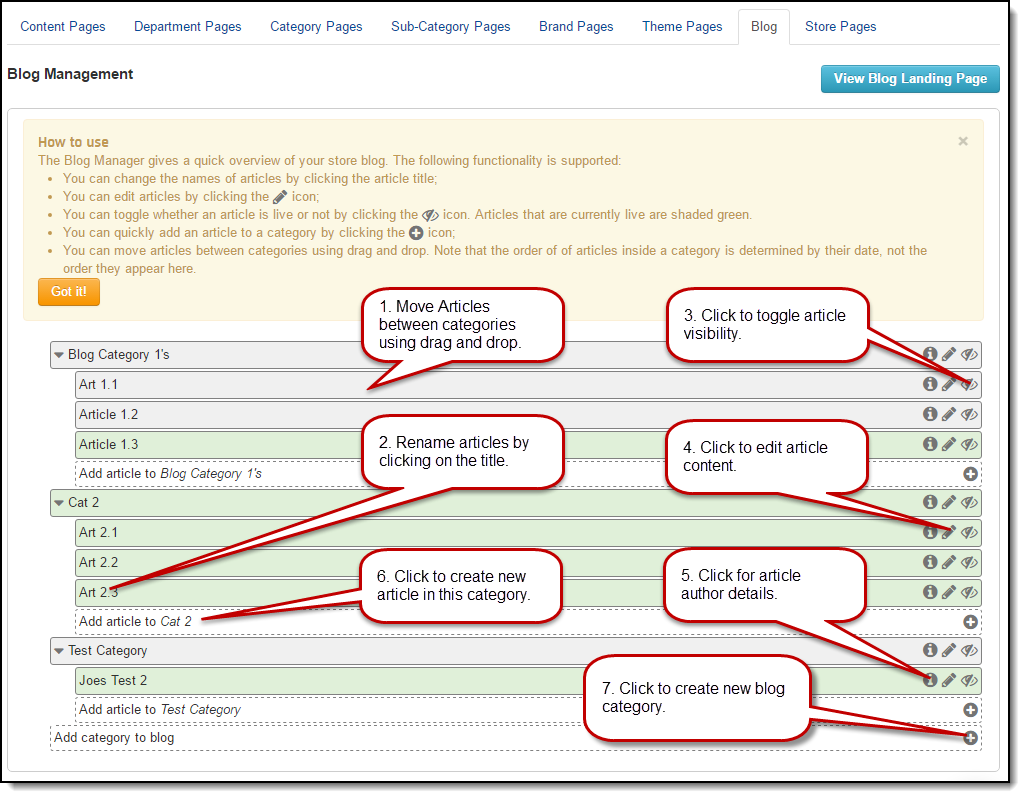
Moving blog articles
- Articles are listed by their creation date in a category.
- Moving articles round in a category will have no effect (you will see the articles re-organize themselves by date as you move them about).
- You can move the articles from one category to another.
- Articles that are not currently in a category then they will be in a group called non-categorized articles at the bottom.
- They can be dragged out from here to a blog category.
- Articles retain their status (visibility) when moved.
- If you move a visible article to a hidden category that article remains visible.
Renaming categories and articles
- You can rename categories and articles by clicking on the title.
- Make your changes and click Save.
Article and category status
- Categories and articles are not live when first created.
- When you make them live they become visible.
- The eye icon allows you to change the status of categories and articles from the interface.
- Visible categories and articles are coloured green, hidden items are coloured grey.
Contact us
If you have any problems with this feature, contact our support team by opening a ticket.